technology-intuitive

Pages

Wednesday, August 13, 2025

Tag&Rename


tipoftheday.wordpress.co...

Tag&Rename is a comprehensive music file tag editor developed by Softpointer, designed to help users organize and manage their digital music collections efficiently. It supports a wide range of audio formats and offers both manual and batch editing capabilities, making it suitable for both casual users and professionals.(FreeDownloadManager)


🎵 Key Features

  • Extensive Format Support: Tag&Rename handles various audio formats, including MP3 (ID3v1, ID3v2.2, ID3v2.3, ID3v2.4), WMA, M4A, MP4, FLAC, APE, WAV, OGG, and more. (softpointer.com)
  • Batch Tag Editing: Allows users to edit tags for multiple files simultaneously, streamlining the process for large music libraries. (musicianwave.com)
  • Automatic Tagging from Online Databases: Integrates with online databases like freedb, Amazon, and Discogs to automatically fetch and update metadata, including album titles and cover art. (MajorGeeks)
  • File Renaming Based on Tags: Enables renaming of files and folders according to their tag information, ensuring consistent naming conventions across your collection. (softpointer.com)
  • Customizable File Naming Masks: Users can define custom naming masks to rename files and folders based on tag information, providing flexibility in organizing their music files.
  • Unicode Support: Fully supports Unicode, allowing for accurate tagging of files in various languages and scripts. (LO4D.com)

⚠️ Limitations

  • Windows-Only Compatibility: Tag&Rename is available exclusively for Windows operating systems.(FreeDownloadManager)
  • Trial Version Restrictions: The trial version has limitations on the number of files that can be processed, requiring a purchase for full functionality.

💡 Alternatives

If you're considering alternatives to Tag&Rename, here are a few options:

  • Mp3tag: A free, user-friendly tag editor supporting various formats and online database lookups. (mp3tag.de)
  • MusicBrainz Picard: An open-source music tagger that uses the MusicBrainz database to tag audio files.(LO4D.com)
  • MediaMonkey: A media management software with robust tagging and organizational features.

For more information or to download Tag&Rename, visit the official website: https://www.softpointer.com


TagScanner


community.chocolatey.org...

TagScanner is a free, multifunctional music tag editor and file renamer developed by Sergey Serkov. It's designed to help users organize and manage their music collections by editing metadata, renaming files, and importing album information from online databases.(Neowin)


🎵 Key Features

  • Batch Tag Editing: Edit tags for multiple files simultaneously, saving time and effort. (Neowin)
  • File Renaming: Rename files based on tag information or custom patterns. (xdlab.ru)
  • Online Database Integration: Import album information and covers from online databases like Discogs, Amazon, and MusicBrainz. (Neowin)
  • Tag Generation: Generate tag information from file and folder names. (The Filibuster Blog)
  • Text Transformation: Perform text replacement and case conversion in tags and filenames. (The Filibuster Blog)
  • Format Support: Supports a wide range of audio formats, including MP3, OGG, FLAC, WMA, MP4 (iTunes), and more. (The Audio File)
  • Embedded Lyrics and Cover Art: Supports embedded lyrics and cover art, with the ability to resize cover art for portable devices. (Neowin)
  • Playlist Management: Create and export playlists to formats like HTML, XML, CSV, or any user-defined format. (Neowin)
  • Unicode Support: Full support for Unicode, allowing for accurate tagging of files in various languages and scripts.
  • Multilingual Interface: Offers a multilingual interface to cater to users worldwide.
  • Built-in Audio Player: Includes a built-in audio player to preview tracks before editing. (Neowin)

⚠️ Limitations

  • Windows-Only Compatibility: TagScanner is available exclusively for Windows operating systems.(FreeDownloadManager)
  • Learning Curve: While powerful, some users may find the interface and features complex without prior experience in tag editing. (snapfiles.com)

💡 Alternatives

If you're considering alternatives to TagScanner, here are a few options:

  • Mp3tag: A free, user-friendly tag editor supporting various formats and online database lookups.
  • MusicBrainz Picard: An open-source music tagger that uses the MusicBrainz database to tag audio files. (xdlab.ru)
  • MediaMonkey: A media management software with robust tagging and organizational features.

For more information or to download TagScanner, visit the official website: https://www.xdlab.ru/en/


Serato DJ Pro


serato.com/dj/pro

Here’s an up-to-date overview of Serato DJ Pro, the industry-standard DJ software trusted by professionals worldwide:(Serato)


🎛️ What Is Serato DJ Pro?

Serato DJ Pro is a comprehensive DJ software suite designed for professional DJs, offering advanced features, seamless hardware integration, and robust performance tools. It supports a wide range of controllers and mixers, making it a versatile choice for various DJ setups.


🔧 Key Features

🎵 Advanced Performance Tools

  • 4-Deck Mixing: Simultaneously mix up to four tracks, ideal for complex sets.
  • Serato Stems: Isolate and remix elements like vocals, drums, and bass in real-time.
  • Slip Mode: Perform edits without affecting the track's original position.
  • Slicer Mode: Chop and rearrange sections of a track for creative remixes.
  • Hot Cues & Loops: Set up to eight cue points and loops per track for dynamic performances.
  • Sampler: Trigger samples, acapellas, and sound effects live.
  • Pad FX: Apply effects like Echo and Brake directly from performance pads. (Pro Sound & Light ShowProduct LondonSerato)

🎚️ Comprehensive Hardware Support

  • Compatible with over 90 industry-leading controllers and mixers.
  • Supports DVS (Digital Vinyl System) setups for turntable integration.
  • Offers MIDI mapping for custom controller configurations. (SeratoPro Sound & Light ShowProduct London)

🌐 Streaming Integration

  • Stream music directly from platforms like Tidal, SoundCloud, and more.
  • Access millions of tracks without leaving the software.

📱 Practice Mode

  • Use Serato DJ Pro without hardware connected, allowing for practice and preparation. (Serato)

💻 System Requirements

Windows:

  • OS: Windows 10 or later
  • Processor: Intel Core i5 or i7 (1.07 GHz or higher)
  • Memory: 4 GB RAM minimum
  • Screen Resolution: 1280 x 720 or higher
  • USB Port: USB 2.0

macOS:

  • OS: macOS High Sierra (10.13) or later
  • Processor: Intel Core i5 or i7 (1.07 GHz or higher)
  • Memory: 4 GB RAM minimum
  • Screen Resolution: 1280 x 720 or higher
  • USB Port: USB 2.0

Note: A CPU that supports the AVX instruction set is required for the latest versions of Serato DJ Pro. (Serato Support)


💰 Pricing

Serato DJ Pro is available via:

  • Subscription: $14.99/month
  • Perpetual License: $249 (one-time payment) (Sweetwater)

✅ Pros & Cons

Pros:

  • Industry-standard software with professional-grade features.
  • Wide hardware compatibility.
  • Advanced performance tools for creative mixing.
  • Seamless streaming integration.
  • Regular updates and support.(Pro Sound & Light ShowProduct London)

Cons:

  • Higher cost compared to entry-level DJ software.
  • Requires a computer that supports the AVX instruction set. (Serato Support)

🧭 Final Thoughts

Serato DJ Pro is a powerful and versatile DJ software solution, ideal for professionals seeking advanced features and reliable performance. Its comprehensive hardware support and integration with streaming services make it a top choice for DJs worldwide. Whether you're performing at clubs, festivals, or private events, Serato DJ Pro provides the tools needed to deliver exceptional sets.


Switch Audio File Converter


nch.com.au/switch/index....

Switch Audio File Converter is a versatile and user-friendly application developed by NCH Software, designed to facilitate seamless conversion between a wide array of audio formats. Whether you're a casual user or a professional, Switch offers a comprehensive solution for all your audio conversion needs.


🎵 Key Features

  • Extensive Format Support: Convert audio files between over 75 formats, including MP3, WAV, FLAC, OGG, AAC, M4A, and more. (nch.com.au)
  • Batch Conversion: Efficiently process multiple files simultaneously, saving time and effort. (nch.com.au)
  • Audio Extraction: Extract audio from video files such as MP4, AVI, MOV, and MPEG, enabling you to convert them into your preferred audio format. (nch.com.au)
  • Metadata Preservation: Maintain music tags (e.g., artist, album, track number) during conversion for supported formats. (Pcmacstore.com)
  • Audio Effects: Apply various effects like normalization, amplification, and equalization to enhance audio quality. (nch.com.au)
  • Preview Functionality: Listen to tracks before conversion to ensure desired output quality. (Filepuma)
  • Playlist Conversion: Import and convert playlists in M3U and PLS formats. (nch.com.au)
  • Command-Line Support: Automate conversions using command-line operations for advanced users.

⚠️ Limitations

  • Free Version Restrictions: The free version is available for non-commercial use and includes most common audio file formats. (nch.com.au)
  • Trial Limitations: Some advanced features may be limited or unavailable in the trial version.

📥 Download Options

  • Official Website: Access the latest version and additional resources. (nch.com.au)(manualzz.com)
  • FileHorse: Download the software from a trusted third-party site. (FileHorse)
  • Google Play Store: For Android users, download the app directly. (Google Play)

StreamFox for Music


streamfox-for-music-wind...

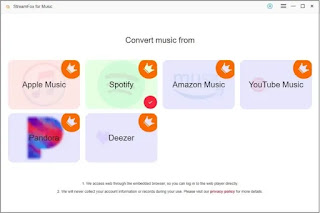
StreamFox for Music is an all-in-one music converter and downloader designed to help users extract high-quality audio from popular streaming platforms. It supports services like Spotify, Apple Music, Amazon Music, Deezer, Pandora, and YouTube Music.


🎵 Key Features

  • True Lossless Audio Conversion: Utilizes ODSMRT technology to download music in formats such as 320 kbps, HiFi, (Ultra)HD, and Hi-Res, ensuring high-quality sound reproduction.
  • Batch Downloading at 50x Speed: Allows users to download multiple songs, playlists, podcasts, audiobooks, albums, radio shows, and more at significantly faster speeds, making it ideal for large-scale downloads.
  • Multiple Format Support: Converts audio files to various formats, including MP3, FLAC, M4A, and WAV, ensuring compatibility with a wide range of devices.
  • Retains ID3 Tags: Preserves original metadata such as artist, album, and track information, facilitating easy organization and management of music libraries.
  • Cross-Platform Compatibility: Available for both Windows and macOS, ensuring accessibility for a broad user base.

⚠️ Limitations

  • Free Trial Restrictions: The free version allows downloading only the first 3 minutes of each song and is limited to a 14-day trial period.
  • Subscription Required for Full Features: To access the complete functionality, including unlimited downloads and full-length tracks, a paid subscription is necessary.

📥 Download Options


If you need assistance with installation or have further questions about StreamFox for Music, feel free to ask!


Studio One


presonus.com/pages/studi...

Studio One is a comprehensive Digital Audio Workstation (DAW) developed by PreSonus, designed to streamline the music production process from start to finish. It offers a unified platform for recording, producing, mixing, mastering, and performing music, making it suitable for musicians, producers, and audio engineers across various genres.(AudioDeluxe)


🎛️ Key Features

  • All-in-One Workflow: Studio One integrates multiple stages of music production into a single application, eliminating the need to switch between different software for various tasks.
  • AI-Powered Stem Separation: Utilizing artificial intelligence, Studio One can extract individual stems (such as vocals, bass, and drums) from a mixed audio track, allowing for separate processing and remixing. (Wikipedia)
  • Splice Integration: The DAW is the first to integrate with Splice, enabling users to browse, preview, and import royalty-free samples directly within the software. (Wikipedia)
  • Spatial Audio Support: Studio One supports Apple Spatial Audio and Dolby Atmos mixing and rendering, catering to immersive audio production needs. (PreSonus)
  • Comprehensive Plugin Support: It is compatible with various plugin formats, including VST3, AU, CLAP, and ARA2, and supports spatial audio mixing up to 9.1.6 channels. (Wikipedia)
  • Extensive Native Content: The software includes over 45 native effects plugins and nine virtual instruments, providing a wide range of tools for music creation. (PreSonus)
  • Live Performance Capabilities: Studio One features live looping and performance modes, making it suitable for live shows and dynamic performances. (PreSonus)

💡 Additional Highlights

  • Drag-and-Drop Interface: The intuitive drag-and-drop functionality simplifies the workflow, allowing users to quickly arrange and edit tracks. (YouTube)
  • Integrated Music Distribution: Studio One offers built-in distribution options with platforms like TuneCore and SoundCloud, facilitating the release of music directly from the DAW. (PreSonus)
  • Collaboration Features: The Pro+ subscription includes collaboration workspaces, enabling users to share projects and receive feedback in real-time. (PreSonus)

📦 Editions and Pricing

  • Studio One Pro 7: A perpetual license offering lifetime access to the software, including all features and updates for the first year. (AudioDeluxe)
  • Studio One Pro+ Subscription: A subscription model providing access to the latest features, plugins, loops, samples, and collaboration tools, with monthly and annual billing options. (PreSonus)

For more detailed information or to explore the software further, you can visit the official PreSonus Studio One Pro page: (PreSonus)


Stream Deck


amazon.com/elgato-stream...

Elgato Stream Deck is a versatile control device designed to enhance productivity and streamline workflows across various applications and platforms. While it gained popularity among content creators and streamers, its utility extends to professionals in fields like video editing, music production, and virtual meetings. The device offers customizable keys that can execute a wide range of actions, from launching applications to controlling smart home devices.(mimolive.com)


🎛️ Key Features

  • Customizable Keys: Stream Deck devices come with a varying number of LCD keys (6, 15, 32, or more), each of which can be programmed to perform specific actions. Users can assign functions such as opening applications, sending messages, or controlling media playback.(mimolive.com)
  • Streamlined Workflows: The device supports the creation of profiles and folders, allowing users to organize and switch between different sets of commands tailored to specific tasks or applications. Smart Profiles enable automatic switching based on the active application. (Elgato)
  • Extensive Integrations: Stream Deck is compatible with a wide range of software and services, including OBS Studio, Zoom, Microsoft Teams, Spotify, and various smart home platforms like Philips Hue and Nanoleaf. This broad compatibility ensures that users can control multiple aspects of their digital environment from a single interface. (Elgato)
  • Rich Plugin Ecosystem: The Elgato Marketplace offers a plethora of plugins that extend the functionality of Stream Deck. These plugins enable users to integrate with additional services, automate complex workflows, and enhance their overall experience. (Elgatomarketplace.elgato.com)
  • Mobile Application: For users on the go, Elgato provides a mobile version of Stream Deck. Available on Android and iOS, the mobile app offers a similar experience to the physical device, with the ability to control applications and services remotely. (Elgato)

🖥️ Hardware Variants

Elgato offers several hardware models to cater to different user needs:

  • Stream Deck Mini: A compact version with 6 customizable keys, ideal for users with limited desk space or those seeking a more portable solution.(Elgato)
  • Stream Deck MK.2: Features 15 customizable keys and an interchangeable faceplate, allowing for a personalized setup.(Polygon)
  • Stream Deck XL: Offers 32 customizable keys, suitable for users requiring extensive control at their fingertips.(mimolive.com)
  • Stream Deck +: Introduces additional features like knobs and a touchscreen, providing enhanced control for live productions and creative workflows.(help.elgato.com)
  • Stream Deck Pedal: Designed for hands-free control, this model allows users to execute commands using foot pedals, beneficial for situations where hand use is limited.

💡 Use Cases

  • Content Creation: Stream Deck simplifies tasks such as scene transitions, media playback, and audience interaction during live streams.
  • Professional Environments: In virtual meetings, users can mute/unmute microphones, share screens, and manage presentations with ease.
  • Creative Workflows: Video editors and music producers can automate repetitive tasks, control playback, and manage multiple applications simultaneously.
  • Smart Home Control: Stream Deck can serve as a centralized hub to control lighting, thermostats, and other smart devices.

📥 Getting Started

To explore the full range of Stream Deck products and software, visit the official Elgato website: (Elgato)(Elgato)

For mobile users, the Stream Deck app is available for download on both Android and iOS platforms.


Spicetify


spicetify.app

Spicetify is an open-source command-line tool designed to enhance and personalize the Spotify desktop application. It allows users to modify the Spotify client by applying custom themes, installing extensions, and creating custom apps, providing a more tailored and feature-rich experience.(TechLatestfunkyspacemonkey.com)


🎨 Key Features

  • Custom Themes: Spicetify enables users to change the appearance of Spotify by applying custom themes that alter colors, fonts, and layout, allowing for a unique visual experience.
  • Extensions: Users can install extensions to add new functionalities, such as additional controls, enhanced features, or integrations with other services.
  • Custom Apps: Spicetify supports the creation and integration of custom apps within the Spotify interface, providing additional pages or features that complement the existing ones.(spicetify.app)
  • Advanced Customization: Through the injection of custom CSS and JavaScript, Spicetify offers deep customization options, enabling users to modify the Spotify client to suit their preferences .(GitHub)

💻 System Compatibility

Spicetify is compatible with the Spotify desktop client on Windows, macOS, and Linux platforms. It operates by injecting custom code into the Spotify client, which is built on the Electron framework, allowing for extensive customization .(XDA Developers)


⚠️ Limitations

  • Command-Line Interface: Spicetify primarily operates through a command-line interface, which may be challenging for users unfamiliar with terminal commands.
  • Updates: Frequent updates to the Spotify client may require users to reapply Spicetify to maintain compatibility .(spicetify.app)
  • No Official Support: As a third-party tool, Spicetify is not officially supported by Spotify, and its use may void any official support agreements.

✅ Ideal Users

Spicetify is ideal for users who:

  • Seek to personalize their Spotify desktop experience beyond the default options.(bytegest.com)
  • Are comfortable using command-line tools and customizing application settings.
  • Desire additional features or functionalities not provided by the standard Spotify client.(GitHub)

For more information or to get started with Spicetify, visit the official website: spicetify.app.